✨ Features
Explore all the powerful features of Taskly.AI
All Features at a Glance
Taskly.AI is packed with features designed to make task management effortless and productive.
🤖 AI Subtask Generation
The star feature of Taskly.AI - automatically break down any project into actionable subtasks.
How It Works
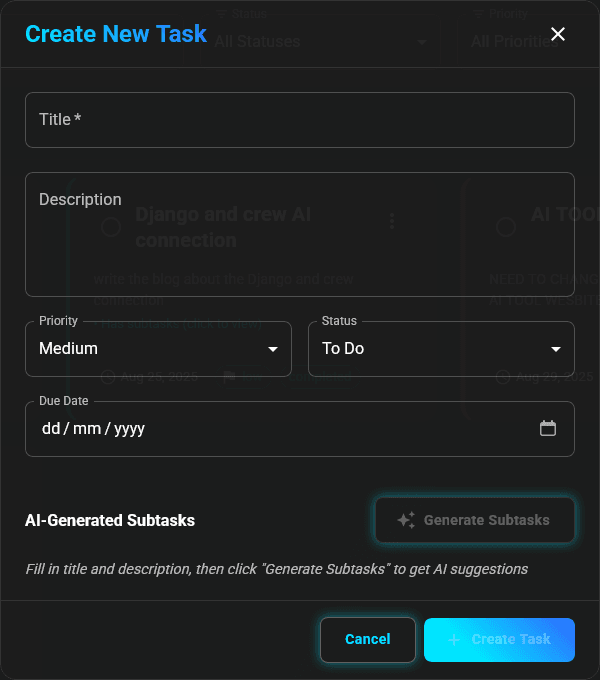
- Describe Your Project: Enter a title and description
- Click Generate: Let AI analyze your project
- Get Subtasks: Receive a detailed breakdown with timelines
- Customize: Edit and adjust as needed
What AI Generates
- Detailed Steps: Clear, actionable subtasks
- Time Estimates: Realistic timelines (Day 1-2, Day 3-5, etc.)
- Logical Sequence: Steps in the right order
- Complete Coverage: Nothing important is missed
The more detailed your project description, the better the AI can break it down!
📊 Smart Dashboard
Get instant insights into your productivity with a beautiful, data-rich dashboard.
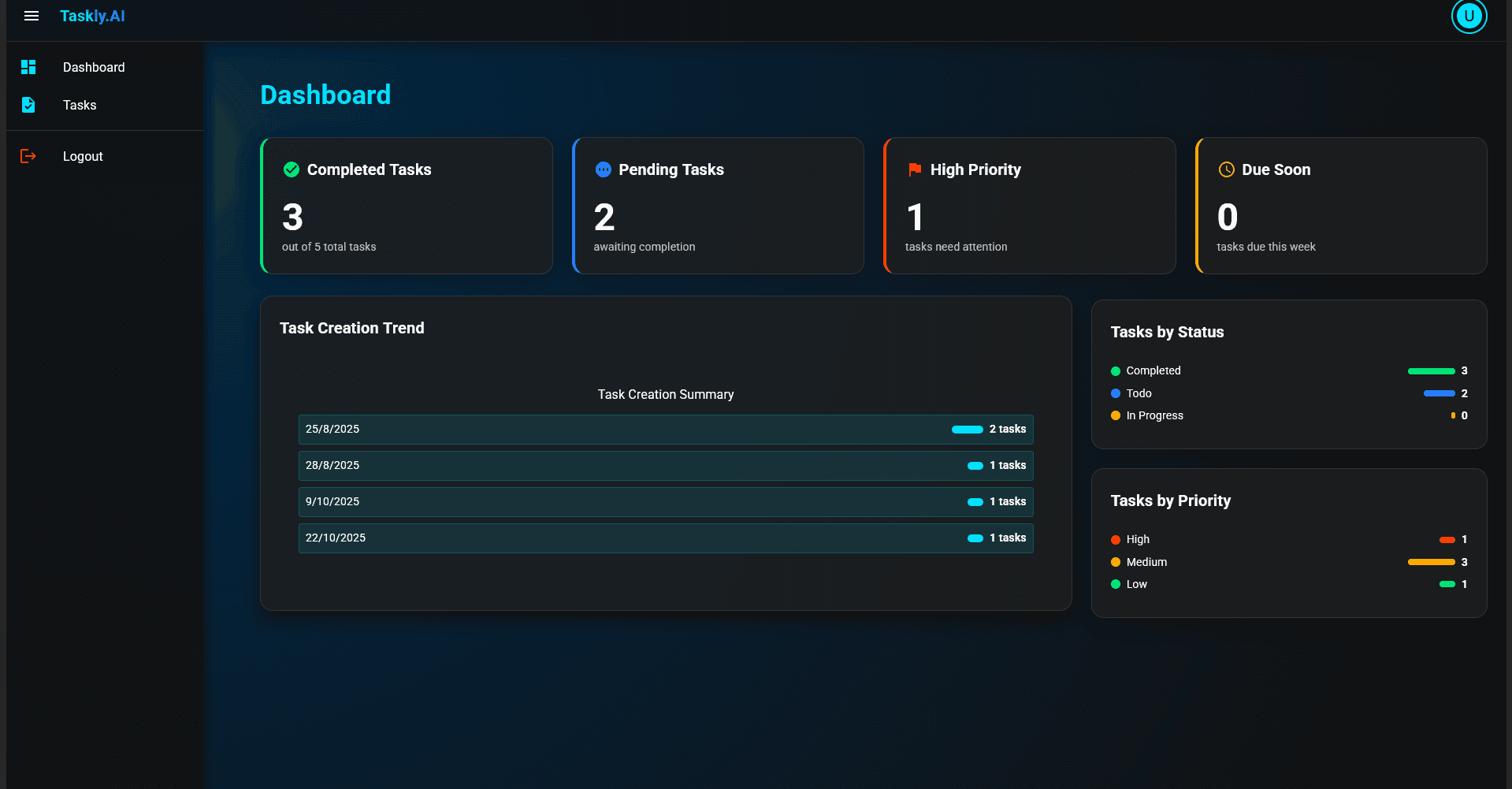
Dashboard Metrics
Completed Tasks
- See how many tasks you've finished
- Track completion percentage
- Celebrate your progress
Pending Tasks
- View tasks awaiting completion
- Monitor what's in progress
- Stay on top of your workload
High Priority
- Quickly identify urgent tasks
- Focus on what matters most
- Never miss critical deadlines
Due Soon
- See tasks due this week
- Plan your schedule effectively
- Avoid last-minute rushes
Task Creation Trend
- Visualize your task creation over time
- Understand your workload patterns
- Plan capacity better
Status & Priority Distribution
- See tasks by status (To Do, In Progress, Completed)
- View priority breakdown (High, Medium, Low)
- Understand your task composition
🎯 Task Management
Create Tasks
Build comprehensive tasks with:
- Title: Clear, descriptive task name
- Description: Detailed project information
- Priority: High, Medium, or Low
- Status: To Do, In Progress, or Completed
- Due Date: Set deadlines to stay on track
Organize Tasks
Priority Levels:
- 🔴 High: Urgent tasks requiring immediate attention
- 🟡 Medium: Important tasks to complete soon
- 🟢 Low: Tasks that can wait
Status Tracking:
- To Do: Tasks waiting to be started
- In Progress: Currently working on
- Completed: Finished tasks
Subtasks
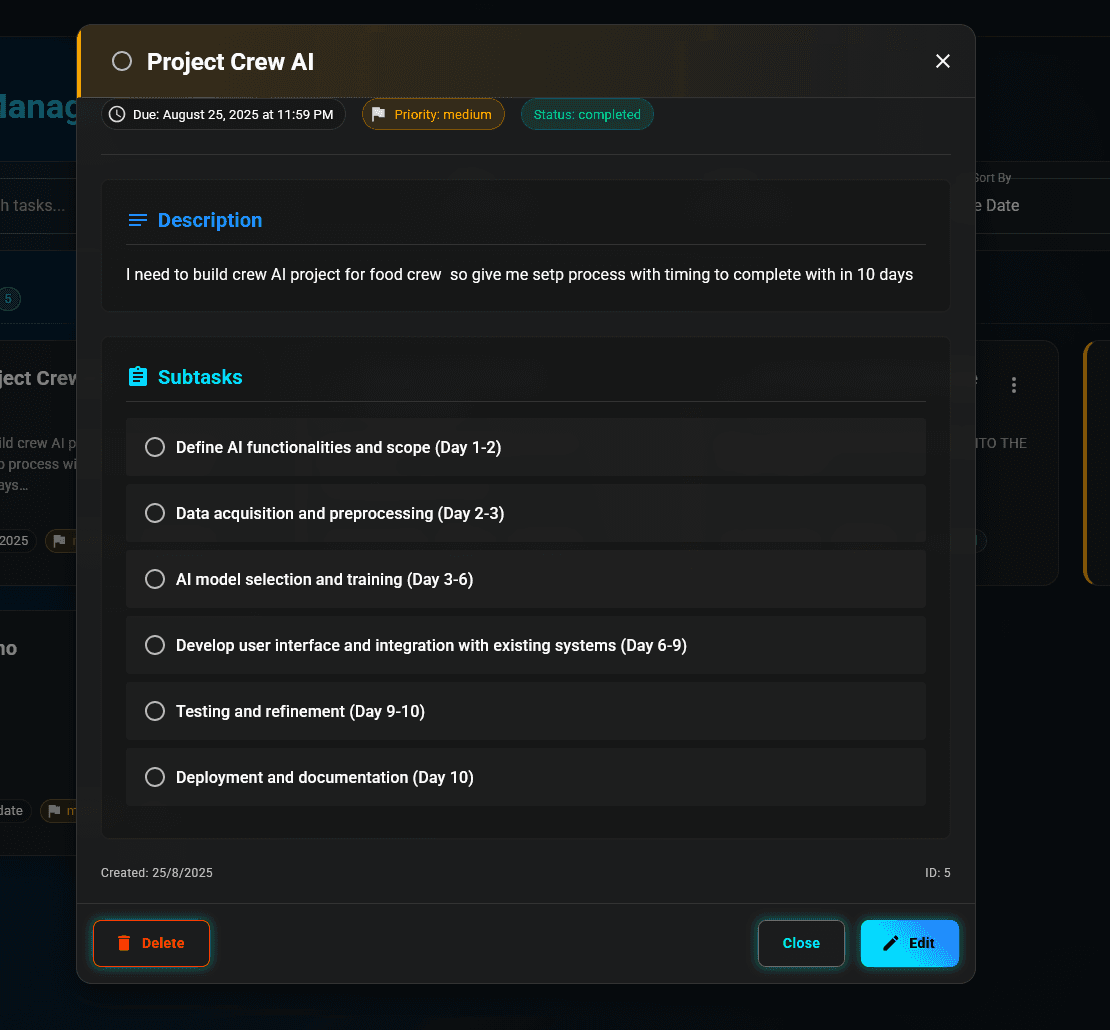
- Break down complex tasks
- Track progress on each step
- Check off completed subtasks
- See overall completion percentage
🔍 Task Details View
Click any task to see:
- Full description
- All subtasks with checkboxes
- Priority and status badges
- Due date and creation date
- Edit and delete options
⚡ Real-Time Updates
- Changes appear instantly
- No page refreshes needed
- Smooth animations
- Fast and responsive
🎨 Beautiful Interface
Dark Mode Design
- Easy on the eyes
- Professional appearance
- Reduced eye strain
- Modern aesthetic
Smooth Animations
- Elegant transitions
- Satisfying interactions
- Polished experience
- Attention to detail
Intuitive Navigation
- Easy to find features
- Clear visual hierarchy
- Logical layout
- User-friendly design
📱 Responsive Design
Works perfectly on:
- 💻 Desktop computers
- 📱 Mobile phones
- 📱 Tablets
- 🖥️ Large screens
🔒 Secure & Private
- User authentication
- Secure data storage
- Private task lists
- Protected information
🚀 Performance
- Lightning-fast loading
- Instant interactions
- Optimized for speed
- Smooth experience
📈 Productivity Insights
Track Your Progress
- See completion rates
- Monitor productivity trends
- Identify patterns
- Improve over time
Visualize Your Work
- Beautiful charts and graphs
- Easy-to-understand metrics
- At-a-glance overview
- Data-driven insights
🎯 Focus Features
Priority Management
- Highlight important tasks
- Filter by priority
- Focus on what matters
- Reduce overwhelm
Due Date Tracking
- Never miss deadlines
- See upcoming tasks
- Plan ahead effectively
- Stay organized
✏️ Easy Editing
- Quick task updates
- Inline editing
🗑️ Task Management
- Delete completed tasks
- Archive old projects
- Clean up your workspace
- Stay organized
🔄 Task Lifecycle
- Create: Add new task with details
- Generate: Use AI for subtasks (optional)
- Plan: Set priority and due date
- Execute: Mark as In Progress
- Track: Check off subtasks
- Complete: Mark as done
- Review: See in dashboard analytics
Want to see a specific feature? We're always improving Taskly.AI based on user feedback!
Next Steps
- Learn more about AI Features
- Read the How to Use guide
- Try Taskly.AI now!