🤖 AI Features
Learn how Taskly.AI uses artificial intelligence to enhance your productivity
AI-Powered Task Management
Taskly.AI leverages artificial intelligence to transform how you manage tasks. Our AI engine analyzes your task descriptions and automatically generates comprehensive subtasks with realistic timelines.
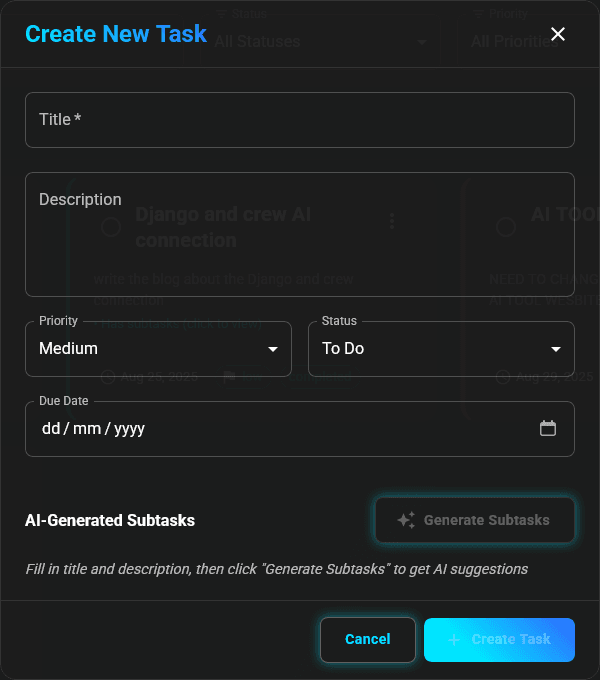
How AI Subtask Generation Works
The Process
Describe Your Task
Simply enter a task title and description. The more detailed your description, the better the AI can understand your project scope.
Example Input:
Title: Build crew AI project for food crew
Description: I need to build crew AI project for food crew so give me step process with timing to complete within 10 days
AI Analysis
When you click "Generate Subtasks", our AI:
- Analyzes your task description
- Identifies key project phases
- Estimates realistic timelines
- Breaks down complex requirements
- Generates actionable subtasks
Review Generated Subtasks
The AI provides a structured breakdown with:
- Clear subtask descriptions
- Time estimates (Day 1-2, Day 2-3, etc.)
- Logical sequence of steps
- Realistic completion timelines
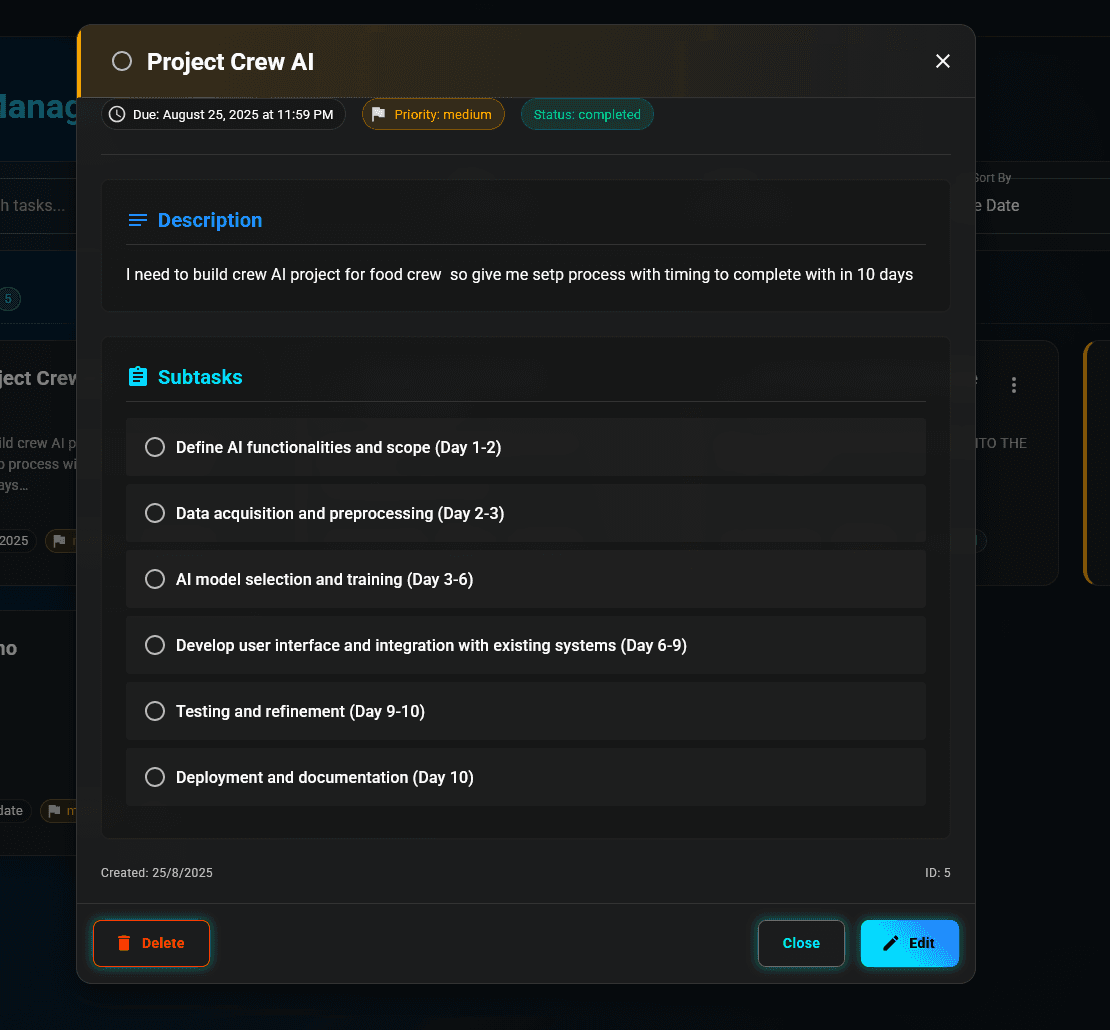
Example Output:
- Define AI functionalities and scope (Day 1-2)
- Data acquisition and preprocessing (Day 2-3)
- AI model selection and training (Day 3-6)
- Develop user interface and integration (Day 6-9)
- Testing and refinement (Day 9-10)
- Deployment and documentation (Day 10)
Customize & Execute
Review the AI-generated subtasks and:
- Edit any subtask as needed
- Adjust timelines based on your schedule
- Add or remove subtasks
- Start executing your plan
AI Capabilities
1. Intelligent Project Breakdown
The AI understands various project types:
Software Development:
- Requirements gathering
- Design and architecture
- Implementation phases
- Testing and QA
- Deployment
Content Creation:
- Research and planning
- Drafting
- Editing and revision
- Publishing
Business Projects:
- Market research
- Strategy development
- Implementation
- Monitoring and optimization
2. Timeline Estimation
The AI considers:
- Task complexity
- Industry standards
- Sequential dependencies
- Realistic work schedules
Timeline estimates are based on typical project patterns. Adjust them based on your team size and resources.
3. Context-Aware Suggestions
The AI adapts to different contexts:
- Technical projects: Includes development, testing, deployment phases
- Creative projects: Focuses on ideation, creation, refinement
- Research projects: Emphasizes investigation, analysis, documentation
Best Practices for AI Generation
Write Effective Task Descriptions
Title: Website redesign
Description: Redesign company websiteResult: Basic subtasks with generic steps
Title: Website redesign
Description: Redesign company website with modern UI,
improve mobile responsiveness, and add new featuresResult: More specific subtasks covering UI, mobile, and features
Title: Website redesign
Description: Complete redesign of company website using React.
Goals: Modern UI with dark mode, full mobile responsiveness,
add blog section, integrate contact forms, improve SEO.
Timeline: 3 weeks. Team: 2 developers, 1 designer.Result: Highly detailed subtasks with specific technologies, features, and realistic timelines
Include Key Information
For best AI results, mention:
- Project Goal: What you want to achieve
- Scope: What's included and excluded
- Timeline: Desired completion time
- Resources: Team size, tools, budget
- Constraints: Limitations or requirements
- Deliverables: Expected outcomes
Example: Detailed Task Description
Title: Mobile App Development - Fitness Tracker

Description:
Develop a cross-platform fitness tracking mobile app using React Native.

Features:
- User authentication and profiles
- Activity tracking (steps, calories, workouts)
- Goal setting and progress visualization
- Social features (share achievements)
- Integration with wearable devices

Timeline: 8 weeks
Team: 3 developers, 1 designer, 1 QA
Tech Stack: React Native, Firebase, Redux
Platform: iOS and Android

Deliverables:
- Functional MVP
- App store submissions
- User documentation
- API documentation
AI Output: Comprehensive breakdown with 15-20 subtasks covering all phases
AI Model Information
Technology Stack
Taskly.AI uses:
- Natural Language Processing (NLP) for understanding task descriptions
- Machine Learning models trained on project management data
- Pattern recognition for identifying project phases
- Time estimation algorithms based on historical data
Continuous Improvement
The AI model improves over time by:
- Learning from user feedback
- Analyzing successful project patterns
- Adapting to industry trends
- Incorporating user customizations
The more you use AI subtask generation, the better it becomes at understanding your specific project patterns and preferences.
Use Cases
Software Development
Input: "Build a REST API for e-commerce platform with user auth,
product catalog, shopping cart, and payment integration"

AI Generates:
✓ Set up project structure and dependencies
✓ Implement user authentication system
✓ Create product catalog endpoints
✓ Build shopping cart functionality
✓ Integrate payment gateway
✓ Write API documentation
✓ Implement testing suite
✓ Deploy to production
Content Creation
Input: "Create comprehensive blog post about AI in healthcare,
3000 words, with research, images, and SEO optimization"

AI Generates:
✓ Research AI healthcare applications
✓ Outline article structure
✓ Write introduction and overview
✓ Develop main content sections
✓ Find and create supporting images
✓ Optimize for SEO
✓ Edit and proofread
✓ Publish and promote
Event Planning
Input: "Organize company annual conference for 200 attendees,
2-day event with speakers, workshops, and networking"

AI Generates:
✓ Define event goals and budget
✓ Secure venue and catering
✓ Invite and confirm speakers
✓ Plan workshop sessions
✓ Set up registration system
✓ Arrange accommodation
✓ Prepare marketing materials
✓ Coordinate day-of logistics
Limitations & Considerations
AI Limitations:
- Requires clear task descriptions for best results
- May need manual adjustment for highly specialized projects
- Timeline estimates are guidelines, not guarantees
- Works best with well-defined project scopes
When to Use AI Generation
✅ Good for:
- Standard project types
- Well-defined scopes
- Projects with clear phases
- Learning project management
- Quick planning sessions
❌ May need manual planning:
- Highly specialized domains
- Unique/unprecedented projects
- Projects with many unknowns
- Extremely tight deadlines
- Projects requiring specific methodologies
Tips for Maximum AI Benefit
- Be Specific: Include technologies, tools, and methodologies
- Set Context: Mention team size, timeline, and resources
- Define Scope: Clearly state what's included and excluded
- Iterate: Regenerate with refined descriptions if needed
- Customize: Edit AI suggestions to match your workflow
- Learn: Observe patterns in AI suggestions to improve your planning
Next Steps
- Try Using Taskly.AI with the step-by-step guide
- Explore all Features available
- Try the Live App now!
Have feedback on AI features? We're constantly improving! Share your experience to help us make the AI even better.